
3D packaging and product mockups
See the design on the format before committing to production.
Practical 3D mockups that help teams review packaging hierarchy, range behaviour and presentation quality before physical samples or final photography are available.
- Best for
- Reviews, pitches and retailer decks
- Inputs
- Artwork, dielines and references
- Outputs
- Angles, ranges and presentations
A decision-making tool
Move from flat artwork to a more useful review.
Flat dielines are essential for production but can be difficult for non-specialists to judge. A 3D mockup makes scale, panel relationships, artwork position and range consistency easier to understand.
I create clean visualisations for creative reviews, client approvals, sales decks and launch planning, with the fidelity matched to the stage of the project.
Three mockup priorities
Clear enough to decide. Accurate enough to trust.
The visualisation is built around the questions the project needs to answer at its current stage.
-
Panel relationships
Show how front, side, back and closure areas work together on the chosen format.
-
Range consistency
Compare SKUs, sizes and variants in one controlled view before rollout.
-
Presentation clarity
Create angles and compositions that make design decisions easy to explain and approve.
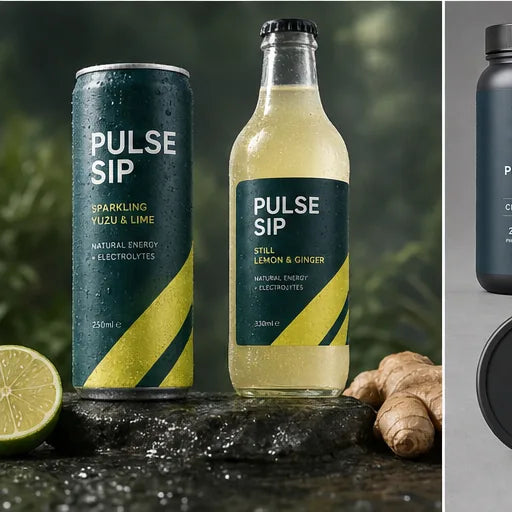

Mockup fidelity
The level of detail should match the decision being made.
Early mockups may use provisional geometry to compare routes quickly. Approval-stage visuals should use confirmed dimensions, dielines, artwork and finish information wherever available.
A mockup is a visualisation, not a substitute for a manufacturer sample. Structural performance, print behaviour and final colour must still be confirmed through the production supplier.
A clear working process
From flat files to a controlled three-dimensional review.
-
Define
Confirm the review purpose, formats, SKUs, source files, angles and required fidelity.
-
Assemble
Prepare suitable geometry and map the supplied artwork to each surface.
-
Check
Review proportions, seams, panels, crops, range consistency and finish assumptions.
-
Export
Supply approved mockup views for presentations, review or launch planning.
Final geometry, artwork, claims, platform specifications and usage approval must be supplied or confirmed by the client before release.
3D mockup scope
Useful views for creative and commercial approval.
The scope can cover one master pack, a representative range or several connected formats.
- Artwork and dieline preparation
- Basic product geometry
- Front and perspective mockups
- Multi-SKU range views
- Presentation-ready compositions
- High-resolution still exports
Before the project begins
3D Mockups questions.
What is the difference between a 3D mockup and a final render?
A mockup is primarily a design review and presentation tool. A final render usually involves more detailed geometry, materials, lighting, art direction and commercial output requirements.
Can you work from a flat dieline?
Yes, where the structure is clear. Dimensions, fold information and format references help create a more reliable result.
Can you show an entire product range?
Yes. Multiple artworks can be mapped to a shared model and arranged into a controlled range composition.
Can mockups be used on a website?
They can where the agreed fidelity and resolution are suitable. Commercial website imagery may benefit from a higher-end rendering scope.
Does the mockup guarantee production appearance?
No. It visualises the intended design. Physical print, material and structural results remain subject to supplier proofing and sampling.
Need a more useful view than a flat dieline?
Make the pack easier to review before production.
Share the artwork, dieline, format references, SKU count and intended use. I will recommend the right level of mockup fidelity and output.